
Missing Numbers Hackerrank problem with C++

https://www.hackerrank.com/challenges/missing-numbers/problem

Solved using sorting two arrays, finding missing number in the loop and putting them in the set.

#include <cmath>
#include <cstdio>
#include <vector>
#include <set>
#include <iostream>
#include <algorithm>
using namespace std;

set<int> findMissing(int n, vector <int> ar1, vector <int> ar2) {
    // using default comparison (operator <):
    sort (ar1.begin(), ar1.end()); 
    sort (ar2.begin(), ar2.end()); 
    
    
    set<int> result;
    int temp = 0;
    for (int i = 0; i < ar1.size(); i++){
        if (ar1[i] == ar2[i+temp]) {
            //all good
        } else {
            //missing number found, increase second array pointer, but keep first one the same
            result.insert(ar2[i+temp]);
            temp++;    
            i--;
        }
    } 
    
    //add the rest of the second array  
    for (int i = ar1.size()+temp; i < ar2.size(); i++){
         result.insert(ar2[i]);
    }
     
    
    return result;
}

int main() {
    /* Enter your code here. Read input from STDIN. Print output to STDOUT */   
    int n;
    cin >> n;
    vector<int> ar(n);
    for(int ar_i = 0; ar_i < n; ar_i++){
       cin >> ar[ar_i];
    }
    
    cin >> n;
    vector<int> ar2(n);
    for(int ar2_i = 0; ar2_i < n; ar2_i++){
       cin >> ar2[ar2_i];
    }
    set<int> result = findMissing(n, ar, ar2);
    
    // print out content:
   
    for (set<int>::iterator it=result.begin(); it!=result.end(); it++)
         cout << *it << ' ';
    cout << endl;
    return 0;
}
Insert a node into Linked list with C++

Check if Linked List is null and just create a Node.
Otherwise, run to the end of the linked list and insert a node at the end.

/*
  Insert Node at the end of a linked list 
  head pointer input could be NULL as well for empty list
  Node is defined as 
  struct Node
  {
     int data;
     struct Node *next;
  }
*/
Node* Insert(Node *head,int data)
{
    if (!head){
        Node *node = new Node();
        node->data = data;
        return node;
    } 
    
    Node *temp = head;  
    while (true) {
        if (!temp->next){
            Node *node = new Node();
            node->data = data;
            temp->next = node;
            return head;
        } 
        temp = temp->next;
    }
}

2D Array easy hackerrank challenge in Swift 3

https://www.hackerrank.com/challenges/2d-array

Had to refresh memory how to parse input from Hackerrank in Swift 3.

import Foundation;

func run() {
    var arr : [[Int]] = []
    for _ in 0 ... 5 { 
       let numbers = readLine()!.components(separatedBy: [" "]).map { Int($0)! }
       arr.append(numbers);
    }
    
    var maxSum = calculateHourglass(arr: arr, x: 0, y: 0)
    
    for i in 0 ... 3 {
        for j in 0 ... 3 {
             let result = calculateHourglass(arr: arr, x: i, y: j)
             if (maxSum < result){
                maxSum = result
             }
        }
    }
    
    print(maxSum)
}

func calculateHourglass(arr: [[Int]], x: Int, y: Int) -> Int {
   var sum = 0
   for i in x ... x+2 {
       if (i == x+1) {
        sum += arr[i][y+1]
       } else {
        for j in y ... y+2 {
            sum += arr[i][j]
        }
       }
   } 
   return sum
}

run()

Display image from Google Docs in the Github readme

The easies way to add an image to the Github readme that I can think of is displaying it from Google Drive. Since the assets are already hosted there.

Paste in the link into Readme.md file on github:

<a href="https://drive.google.com/uc?export=view&id="><img src="https://drive.google.com/uc?export=view&id=" style="width: 500px; max-width: 100%; height: auto" title="Click for the larger version." /></a>

You’ll need to grab the ID of the image. Easiest way on the desktop is to right click the file in the drive and select View on the Web. Grab the string of characters from there and replace the in the code above with it.
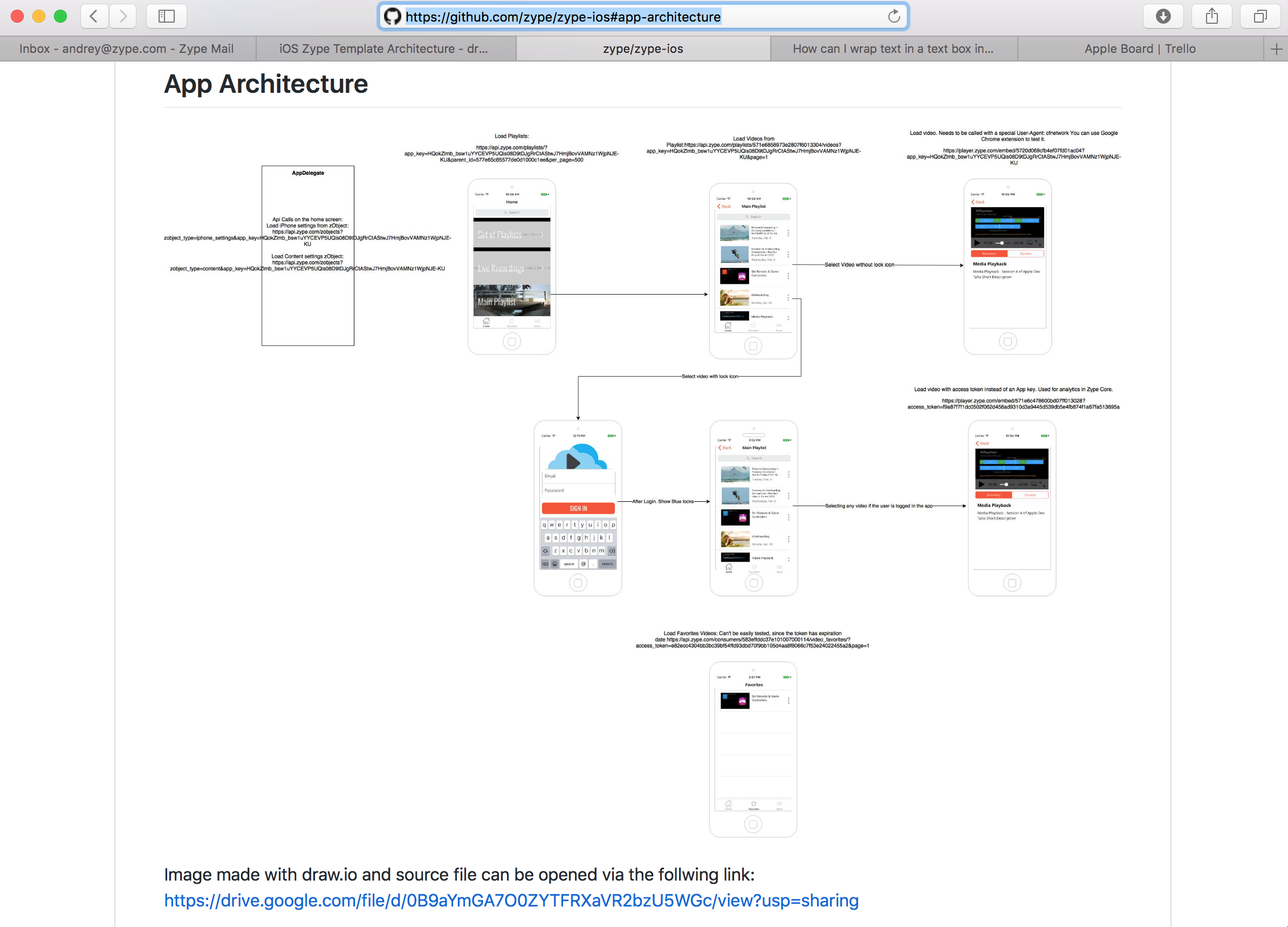
Result can be seen here: https://github.com/zype/zype-ios#app-architecture

Result snapshot

Result snapshot

How to hide strange unwanted Xcode 8 logs

Running app in the simulator in a new shine xcode 8 noticed that there are a lot of extra information that is coming from the logs.
To disable it and see regular logs do the following:
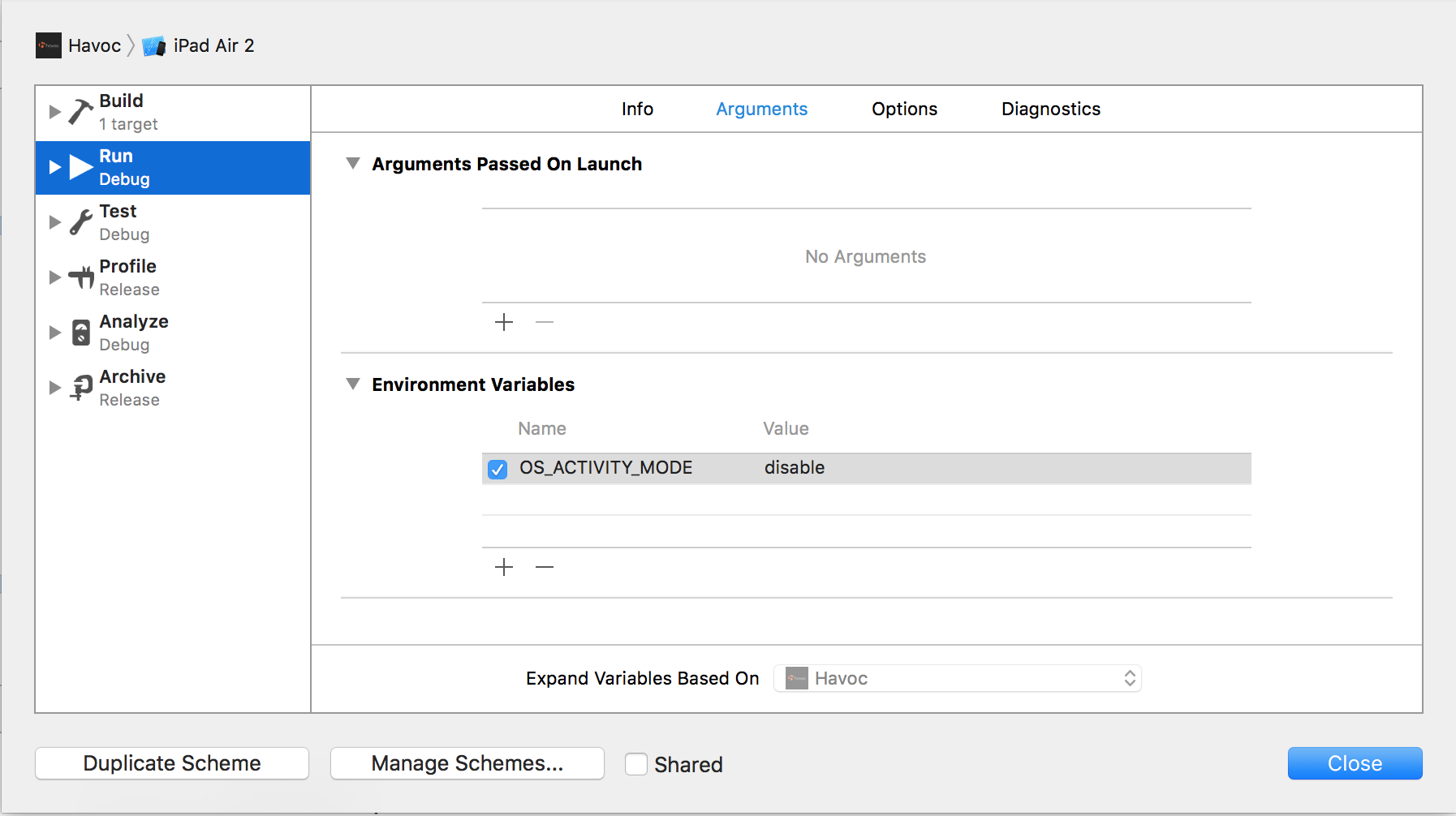
1. Click on your project name and select “Edit Scheme”
2. Add environment variable OS_ACTIVITY_MODE and set it to “disable”
screen-shot-2016-09-19-at-5-07-53-pm

Woooo, your logs should be clean now!

Singleton in iOS

Recommended way of creating singleton according to Apple is in the following way:

+ (AKMySingleton *)sharedInstance {
    
    static AKMySingleton *_sharedInstance = nil;
    static dispatch_once_t onceToken;
    
    dispatch_once(&onceToken, ^{
        _sharedInstance = [[[self class] alloc] init];
    });
    
    return _sharedInstance;
}

Dispatch-once is a synchronous operation that will make sure that there are no multiple threads that are trying to allocate and instantiate singleton.

Problem

Given an array of elements, find the maximum possible sum of a

  1. Contiguous subarray
  2. Non-contiguous (not necessarily contiguous) subarray.

Empty subarrays/subsequences should not be considered.

Input Format

First line of the input has an integer . cases follow.
Each test case begins with an integer . In the next line, integers follow representing the elements of array .

Constraints:

The subarray and subsequences you consider should have at least one element.

Output Format

Two, space separated, integers denoting the maximum contiguous and non-contiguous subarray. At least one integer should be selected and put into the subarrays (this may be required in cases where all elements are negative).

Sample Input

2 
4 
1 2 3 4
6
2 -1 2 3 4 -5

Sample Output

10 10
10 11

Explanation

In the first case:
The max sum for both contiguous and non-contiguous elements is the sum of ALL the elements (as they are all positive).

In the second case:
[2 -1 2 3 4] –> This forms the contiguous sub-array with the maximum sum.
For the max sum of a not-necessarily-contiguous group of elements, simply add all the positive elements.

Solution

func maxSubarray(array : [Int]) -> Int{
    var max_ending_here = array[0]
    var max_so_far = array[0]
    //2 -1 2 3 4 -5
    for i in 1..<array.count {
        let x = array[i]
        max_ending_here = max(x, max_ending_here + x)
        max_so_far = max(max_so_far, max_ending_here)
    }
    
    return max_so_far 
}

// read the integer n
var numberOfTestCases = Int(readLine()!)!
for testCase in 0..<numberOfTestCases {

    var numberOfElements = Int(readLine()!)!
    //store input into array
    var arr : [Int] = readLine()!.characters.split(" ").map{Int(String($0))!}
    
    //find sum of Contiguous subarray. Using Kadane's algorithm in Swift
    let sum1 = maxSubarray(arr)
    
    //find sum of Non-Contiguous subarray. Just sum up all positive values
    var sum2 = 0
    for index in 0..<numberOfElements {
        if (arr[index] > 0) {sum2 = sum2 + arr[index]}
    }
    //if sum2 is still 0 it means all elements are negative or 0's, so we will find a biggest
    if (sum2 == 0){
        sum2 = arr[0]
        for index in 1..<numberOfElements {
            if (arr[index] > sum2) {sum2 = arr[index]}
         }
    }
    
    print("\(sum1) \(sum2)")
}

Diagonal Difference from HackerRank in Swift

Problem

Given a square matrix of size , calculate the absolute difference between the sums of its diagonals.

Input Format

The first line contains a single integer, . The next lines denote the matrix’s rows, with each line containing space-separated integers describing the columns.

Output Format

Print the absolute difference between the two sums of the matrix’s diagonals as a single integer.

Sample Input

3
11 2 4
4 5 6
10 8 -12
Sample Output

15
Explanation

The primary diagonal is:
11
5
-12

Sum across the primary diagonal: 11 + 5 – 12 = 4

The secondary diagonal is:
4
5
10
Sum across the secondary diagonal: 4 + 5 + 10 = 19
Difference: |4 – 19| = 15

Solution

// read the integer n
var n = Int(readLine()!)!
// declare 2d array
var arr : [[Int]] = []

// read array row-by-row
for index in 0..<n {
    arr.append(readLine()!.characters.split(" ").map{Int(String($0))!})
}
var preimaryDiagonalSum = 0
var secondaryDiagonalSum = 0
for index in 0..<n {
    preimaryDiagonalSum = preimaryDiagonalSum + arr[index][index]
    secondaryDiagonalSum = secondaryDiagonalSum + arr[index][n-index-1]
}

print(abs(preimaryDiagonalSum - secondaryDiagonalSum))


Google phone interview for iOS mobile developer position

An outline of google phone interview:

Question 1

// Create a function that takes int numbers[1000] and sorts it into ascending order (lowest to highest)

I asked an interviewer if bubble sort is ok, or does he wants something more complex. He said that bubble sort is good enough. I also talked about the complexity, the worst is n squared.

-(NSArray*)sortArray:(NSArray*)arr{
    NSMutableArray *temp = [[NSMutableArray alloc] initWithArray:arr];
    for (int j = 0; j<[temp count]; j++){
        for (int i=0; i<[temp count] - 1; i++){
            if([temp[i] intValue] > [temp[i+1] intValue]){
                int x = [temp[i] intValue];
                temp[i]= [NSNumber numberWithInt:[temp[i+1] intValue]];
                temp[i+1] = [NSNumber numberWithInt:x];
            }	
        }
        
    }
    return temp;
}

Question 2

// Returns an array of NSDates with the contents of unsortedDates sorted
// in ascending order (oldest in the past to furthest in the future)

+ (NSArray *)sortDates:(NSArray *)unsortedDates {
if(!unsortedDates)
return nil;	
NSSortDescriptor *descriptor = [[NSSortDescriptor alloc] initWithKey"@"self" ascending:YES];
	NSArray *results = [unsortedArray sortedArrayUsingDescriptor:descriptor];
return results;
}

Question 3

// Implement recursiveHierarchy on a UIView hierarchy.
The first version of the question was to simply log it one after another and a second version was to output with a little spaces in the beginning that show the deepness of the recursive function. I suggested that using Categories would be a good solution.

Code below is for the second version.

@interface UIView (ViewLogAddition)
-(void)logHierarchy;
@end
@implementation UIView (ViewLogAddition)
- (void)logHierarchy:(int)deepness {
    
    NSMutableString *mutString = [NSMutableString new];
    
    for (int i=0; i< deepness; i++){
        [mutString appendString:@"   "];
    }
    if (deepness > 0)
        [mutString appendString:@"|"];
    NSLog(@"%@ %@",mutString, [self class]);
    for (UIView* subview in self.subviews){
        [subview logHierarchy:++deepness];
    }
}
@end

//To call the function from the main program

UIView* view;
[view logHierarchy:0];

Initial output

<UIView>
<MDCFlexibleHeaderView>
<UIView>
<UIScrollView>
<UIView>

Output (Mk2)

<UIView>
   | <UIScrollView>
   |    | <UIView>
   |    | <UIView>
   |    | <UIImageView>
   |    | <UIImageView>
   | <_UILayoutGuide>
   | <_UILayoutGuide>
   | <MDCFlexibleHeaderView>
   | <UIView>